I use Mermaid.js. But managing dozens of separate diagrams? It is a little bored. Context switching between files or tabs is pure friction. So, I decided to build a fix.
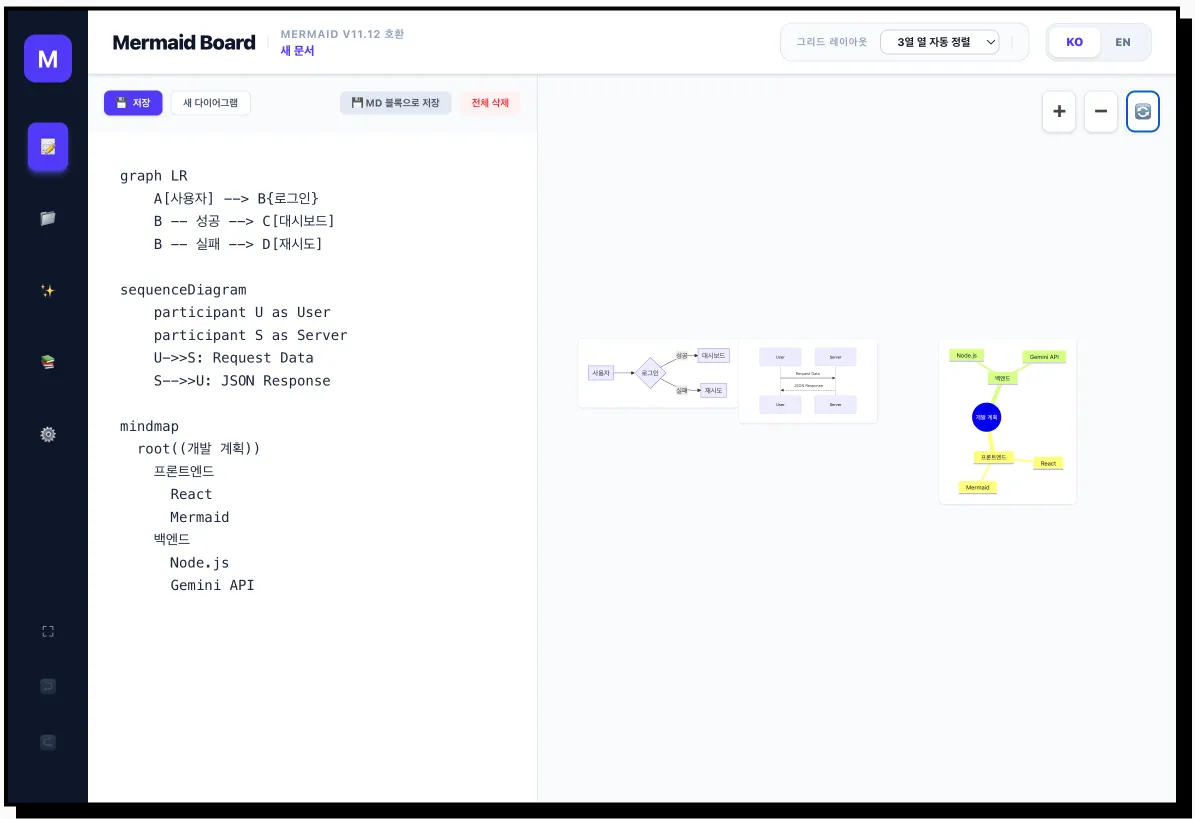
Mermaid Board lets you see and manage multiple diagrams in a single, blazing fast workspace. No more bouncing around.
The Stack & MVP
I initially wanted to go full WYSIWYG, but let’s be real—Mermaid’s syntax is a bit of a moving target across different chart types. To keep it a true MVP and avoid wasting times on edge cases, I focused the interactive features (like node adding and AI explanation) on graph blocks for now. It covers 90% of my use cases, and I didn’t want to over-engineer it.
AI Integration
Since “AI everything” is the current meta, I used Google AI Studio (Gemini).
- Generate diagrams from scratch with a prompt.
- Fix syntax errors instantly.
- Just bring your own API key—no middleman, Gemini key or OpenAI API compatible.
Get it here
- Source Code: Github Mermaid Board
- Live Web App: Mermaid Board
It’s fully open source. If this saves you some time, drop a star on GitHub. It keeps me motivated to keep building in public. 🤩
Note: This post was originally written in Korean and AI helped me to translate to English.